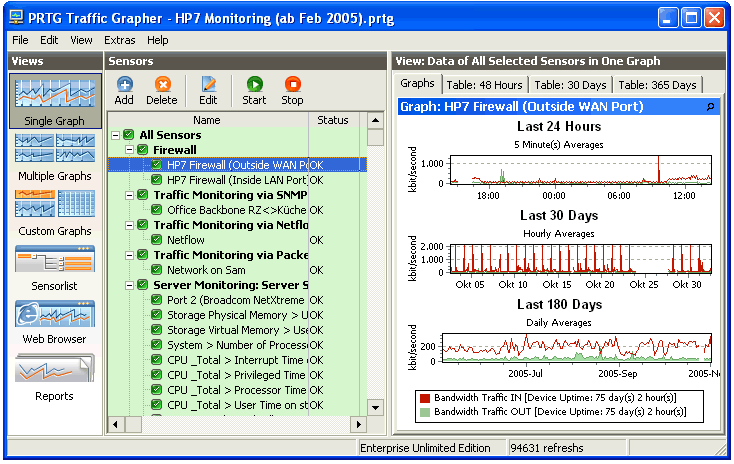
PRTG Traffic Grapher is an easy to use Windows application for monitoring and classifying bandwidth usage. It provides system administrators with live readings and long-term usage trends for their network devices. PRTG is mainly used for bandwidth usage monitoring, but may also be used to monitor many other aspects of a network such as memory and CPU utilization. With PRTG Traffic Grapher the user receives comprehensive bandwidth and network usage data that helps to optimize the efficiency of the network. Understanding bandwidth and resource consumption is the key to better network management: Avoid bandwidth and server performance bottlenecks; Find out what applications or what servers use up your bandwidth; Deliver better quality of service to your users by being proactive; Reduce costs by buying bandwidth and hardware according to actual load. The Freeware Edition of PRTG Traffic Grapher is completely free for personal and commercial use and may be downloaded for free. PRTG Traffic Grapher is designed to run on a Windows machine in your network for 24 hours every day, and constantly records the network usage parameters. The recorded data is stored in an internal database for later reference. Using an easy to use Windows interface you can configure the monitored sensors as well as create usage reports. For remote access PRTG Traffic Grapher comes with a built-in web server to provide access to graphs and tables. All common methods for network usage data acquisition are supported: SNMP: Simple Network Management Protocol is the basic method of gathering bandwidth and network usage data. It can be used to monitor bandwidth usage of routers and switches port-by-port as well as device readings like memory, CPU load etc. Packet Sniffing: With its built-in Packet Sniffer PRTG can inspect all network data packets passing the network card to calculate the bandwidth usage. NetFlow: The NetFlow protocol is supported by most Cisco routers to measure bandwidth usage.

 MP3 Audio Recorder - Record any sound and audio stream from PC or internet.