Version: 1.0
Platform: Win98,WinME,WinNT 4.x,Windows2000,WinXP,Windows200
Price: 49.00 USD [
Buy Now]
Screenshot: View Screenshot
License: Commercial
Limitations: None
Date: 2004-11-24
Size: 2.50
Rate:  Publisher:
 Bytewiser Data Systems, Inc.
Support: support@supportwindow.com
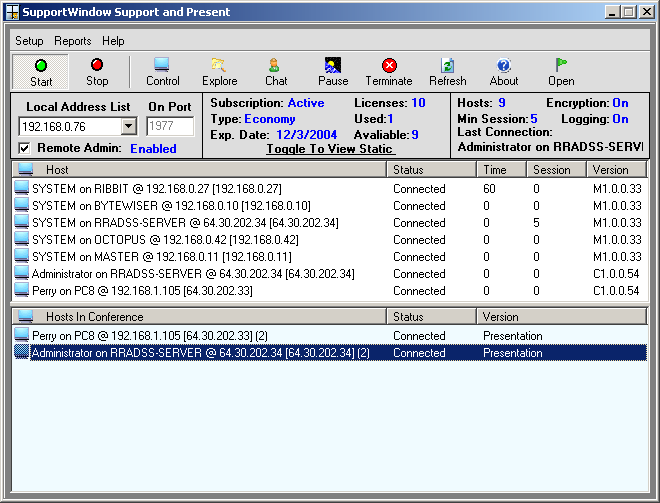
SupportWindow Console accepts incoming connections from multiple SupportWindow Hosts and SupportWindow Services to allow complete remote desktop control, file sharing and Chat. Optional registration of Presentation Mode allows the console operator to do desktop presentations which multiple connected Support Hosts may view. Perfect for explaining software functions to remote users. The Support Host is free. All remote sessions also require a client license which can be purchased in static license packs or subscriptions or both can be combined for the ultimate in licensing flexability. By installing SupportWindow Service applications on remote servers and having them make automatic connections to a running console an operator can access and administer any server simply by clicking on it s name in the connection list. Because the services are making outgoing connections to the console, no opening of firewall ports on those networks is required. These connections are self maintaining, allowing for logon, log off and reboot. SupportWindow Hosts connect on user demand and allows for one touch connection for your remote users so no explaining "how to" is required. Once connected, a console operator may open remote control, file sharing and chat sessions as required. The Support Host is free to deploy, making it very economical to provide support access for a large number of potential users. Perfect for software developers and administrators that may or may not actually ever need to support a particular workstation but must to be ready should the need occur. Remote administration of the console can be achieved via the SupportWindow Client application. The Console has facility for session time reporting and site codes to report on total time spent in session with any workstation, server or customer with multiple PCs. Registration of the Console includes 5 static client licencses.

 MP3 Audio Recorder - Record any sound and audio stream from PC or internet.